HW 10
- Due May 02 11:59 PM
1 Learning Objectives
By the end of this lesson students will be able to:
- Use the MATLAB PID Tuner app to design a PI, PID, or PIDF controller for a given plant
- Distinguish between reference tracking and input disturbance rejection from a control engineer’s point of view
- Read and interpret rise time, settling time, percent overshoot, gain margin, and phase margin from PID Tuner
- Justify a controller design choice with quantitative evidence from PID Tuner
2 The System
Assume you work at a company that designs and builds an infant radiant warmer, which is a medical device that keeps a newborn baby warm. In the final device, a clinician will the desired temp to 37 °C on the control panel and an infra-red light source will gently heat the baby as needed to maintain the body temp at 37 °C. We will model the infant warmer as a standard feedback control system, but also allow for a disturbance:
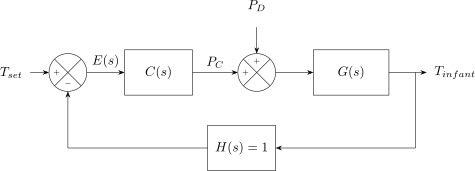
Physically, a disturbance represents something like a brief change in ambient room temperature. In this diagram, is the controller, is the plant (the thermal characteristics of the infant), and is the temperature sensor in the feedback loop. Assume
Your goal is to create and tune a PID controller for this system using the MATLAB PID Tuner app.
3 Required Reading
Read the MathWorks documentation on tuning a PID controller to balance reference tracking and input-disturbance rejection.
4 Student Exercises
Submit a single PDF to Blackboard containing your numbered answers, screenshots, and a list of references. Number every answer.
4.1 Submission Checklist
4.2 Student Exercise 1 — Open PID Tuner and Start with a PI Controller
In MATLAB, define as a transfer function, set the controller as a PI controller, and open PID Tuner. Add an Input Disturbance Rejection plot from the Add Plot menu so that the reference-tracking and input-disturbance-rejection plots are tiled side by side.
How do you display the plots side-by-side?
In your own words, briefly explain what the Reference Tracking plot shows. Do not answer “Reference tracking is the response at to signals at ” because that does not explain anything. Use your own words.
In your own words, briefly explain what the Input Disturbance Rejection plot shows. Answer in terms of the infant warmer (e.g., what is happening physically when the disturbance step is injected, and what would a “good” rejection look like?).
4.3 Student Exercise 2 — Show System Characteristics
Explore the menus in PID Tuner until you figure out how to display rise time, settling time, percent overshoot, gain margin, and phase margin.
Describe how you display the metrics.
Record the value of each metric for the initial (default) PI design. You will compare against this baseline in later exercises.
4.4 Student Exercise 3 — Tune for Disturbance Rejection
Adjust the Transient Behavior slider to improve disturbance rejection while keeping the controller type set to PI.
How do you know it worked? Justify quantitatively (e.g., the settling time of the disturbance step dropped from s to s).
Include a screenshot of your tiled plots.
4.5 Student Exercise 4 — Tune for Reference-Tracking Settling Time
Now adjust the Transient Behavior slider (and Response Time, if needed) to make percent overshoot in the Reference Tracking plot less than the baseline value while also making settling time less than the baseline.
How do you know it worked? Quantitatively justify your answer.
Include a screenshot.
Comment on the trade-off: what happened to the disturbance-rejection plot when you optimized for reference-tracking settling time? This is the central tension the MathWorks documentation describes — describe it in your own words using your numbers.
4.6 Student Exercise 5 — Switch to a PID Controller
Reset the design (the Reset Design button restores defaults). Change the controller type from PI to PID.
Research online to discover the difference between a PID and a PIDF controller in MATLAB. What does the “F” stand for, what does it physically represent, and when would an engineer prefer PIDF over PID? Cite the source(s) you used.
Without making any slider adjustments, how has switching from PI to PID changed the reference-tracking response and the input-disturbance response? Did it improve or worsen one or both? Include a screenshot and quantitatively justify your comments.
4.7 Student Exercise 6 — Explore the Sliders
Click Update Block to make your tuned PID response the new baseline so you can see the effect of slider changes against a fixed reference.
What effect does decreasing Response Time (slower response) have on , , and ? (Increase / decrease / no change for each.)
What effect does increasing Transient Behavior aggressiveness have on , , and ? (Increase / decrease / no change for each.)
Briefly explain in 1–2 sentences why these trends make physical sense, given what you already know from Lesson 21 about how each gain affects the response.
4.8 Student Exercise 7 — Meet a Specification
Reset the design. Adjust Response Time and Transient Behavior until your closed-loop reference-tracking response meets all of the following specifications:
- Percent overshoot
- Rise time s
- Settling time s
Hint: Use the up and down arrows next to the numeric Response Time and Transient Behavior fields to adjust the values precisely.
Include a screenshot of your final plots with all five metrics (rise time, settling time, %OS, gain margin, phase margin) visible.
Report the resulting , , and .
What effect did this tuning have on input-disturbance rejection? Quantitatively compare to the disturbance rejection you measured in Exercises 4 and 5.