Lesson 18
1 Learning Objectives
By the end of this lesson students will be able to:
- Define stability in terms of BIBO
- Describe how gain, and the controller, can make a system unstable
- Determine if a system is stable
- Generate a root locus plot for a system
- Determine the pole location on a root locus plot for a specific value
- Determine a maximum value for a system before it becomes unstable
- Determine system response given gain, or vice versa
- Calculate the gain and phase margin of a system
2 Definition of Stability
We talked about how the response of a differential equation has two parts in Lesson 10:
- Transient (free, natural). The homogeneous solution .
- Forced (steady-state). The particular solution .
The input to the system determines the forced response, . If the input is bounded, the output will be bounded. Bounded is math language for “does not go off to infinity.”
- For example, is unbounded because as
- In contrast, is bounded because the value of never exceeds
The natural response, , is determined by the components that make up the system and can fall into three categories:
- Stable: as
- Unstable: as
- Marginally stable: constant or oscillating as
2.1 Bounded-Input, Bounded-Output (BIBO)
- Stable system: every bounded input gives a bounded output
- Unstable system: any bounded input gives an unbounded output
- Just because a system is stable does not mean that it’s a “good” system. The system could be stable and have a really bad time response, damping ratio, etc.
3 Closed-Loop Stability
Given a generic closed-loop system without a disturbance:
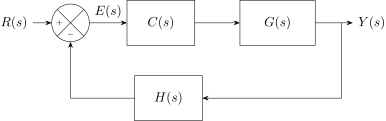
The transfer function of the entire system simplified to one block is
The stability of depends on the location of the poles (roots of the denominator):
- Stable: all poles on the left-hand side of the plane
- Marginally stable: one or more poles on the y-axis in different locations
- Unstable: multiple poles in the same location on the y-axis, or one or more poles on the right-hand side of the plane
- Notice that the denominator of contains terms for the controller, , and for a system in the feedback loop, . Since the roots of the denominator of determine system stability, the controller and feedback system affect pole location, and therefore stability.
3.0.1 Example 1
Assume a closed-loop system with unity feedback, a proportional controller and a plant transfer function of .
Find the location of the poles of .
Kp = [30];
denT = [0.5 4 23 (34+Kp)];
CLpoles = roots(denT)
3.0.2 Student Exercise 1
Given the system from Example 1, find the poles if 1, 50, 100, 150, 200, 250 and classify each as stable, marginally stable, or unstable.
So what we’ve seen is that the gain changes the pole location. This is true for anything that goes in the controller block, not just a proportional controller.
Also note that there’s an upper limit to how much you can increase the gain before the system becomes unstable. If you had to guess, what’s the approximate maximum gain?
4 Root-Locus Method
A root-locus plot is a way to visualize the effect of controller gain on pole location.
4.0.1 Example 2
Generate a root-locus plot of a unity feedback system with and .
| Pole Location | |
|---|---|
| 0.001 | |
| 1 | |
| 2.25 | |
| 4 | |
| 10 | |
| 100 |
4.1 Using MATLAB for Root Locus Plots
We can use MATLAB to create root locus plots:
- Define the transfer function, then
- Use
rlocus(C(s)*G(s)*H(s))
- The value you put into
rlocus()must be the open-loop transfer function without the controller gain.
4.1.1 Example 3
Just create the root-locus plot. Assume .
sysCGH = tf(1,[1 3 0]);
rlocus(sysCGH)
4.1.2 Example 4
Assume a value for , where does it fall on the plot?
sysCGH = tf(1,[1 3 0]);
KP = 2;
CL_roots = rlocus(sysCGH,KP)
4.1.3 Example 5
Click on the plot to get the roots for the location.
sysCGH = tf(1,[1 3 0]);
rlocus(sysCGH)
[KP,CL_roots] = rlocfind(sysCGH)
4.1.4 Student Exercise 2
Generate the root locus plot for the following system. Assume . At approximately what gain does the system become unstable?
5 Stability Margins
Stability margins are another way to check if a system is stable. They have a particular advantage over root-locus plots: they more readily tell an engineer how much gain is required to make the system unstable.
Here are the steps:
- Find the loop gain of your system. This is the product of all the transfer functions in the feedback loop: . It is implied that the proportional gain, , has been factored out.
- Define a
tf()containing the loop gain; you can also usezpk(). - Use
margin()to find the gain and phase margin.
Do this to get actual numbers:
[Gm, Pm, Wgm, Wpm] = margin(Kp*sysCGH)Do this to get a plot with the numbers:
margin(Kp*sysCGH)5.1 Gain Margin
- Find the where the phase plot is . Then locate the magnitude at that . The difference between the magnitude and 0 dB is called the gain margin.
- The gain margin is the amount you can increase the gain before the system becomes unstable.
- The number returned by the
margin()function is not in dB. The number on themargin()plot is in dB.
5.2 Phase Margin
- Find the unity-gain crossover frequency, , on the magnitude plot. This is where the magnitude crosses 0 dB.
- Read the difference in phase angle between and the angle at the frequency . This difference is the phase margin.
- The phase margin is the amount of lag that can be added to a system before it becomes unstable.
5.2.1 Example 6
Find the gain and phase margin for a unity feedback system in which
and
- In problems where no initial gain is specified, set . Use
zpk()if given the poles instead of the polynomial.
sysCGH = zpk([],[-2 -4 -5],1)
Kp = 1;
margin(Kp*sysCGH)
[Gm, Pm, Wgm, Wpm] = margin(Kp*sysCGH)
5.2.2 Student Exercise 3
Find the gain and phase margin for a unity feedback system in which
and
- You are looking for the magnitude at the frequency at which phase is (i.e., the gain margin). If the magnitude curve is already at 0 dB, then the gain margin is zero and gain cannot be increased any more or else the system will become unstable. Once the gain margin is exceeded, the system will be unstable for all inputs.